Note: If your WPF UserControl is hosted in MFC Window, you may want to clean-up the ViewModel that is DataContext of your UserControl. Since Unloaded event is not called reliably for the UserControl when the hosting MFC Window closes, there is a need for another solution. XAML: < UserControl x : Class = "Views.MyUserControl" xmlns = "http://schemas.microsoft.com/winfx/2006/xaml/presentation" xmlns : x = "http://schemas.microsoft.com/winfx/2006/xaml" xmlns : mc = "http://schemas.openxmlformats.org/markup-compatibility/2006" xmlns : d = "http://schemas.microsoft.com/expression/blend/2008" ...
While working with WPF Visual Tree, one of the common tasks is to find the Parent(Ancestor) or Child of any specific element (DependencyObject). The following piece of code traverses the visual tree recursively and finds the type of parent you are looking for related to the element you pass in. For example: If the Visual Tree hierarchy is like this: Grid StackPanel ListBox You can call the function like this to find the Grid: FindAncestor (( DependencyObject )ListBox) ; public static T FindAncestor ( DependencyObject dependencyObject) where T : DependencyObject { var parent = VisualTreeHelper .GetParent(dependencyObject); if (pare...
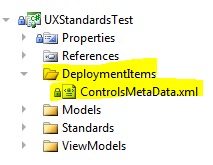
Scenario: I have a test that needs a file deployed inside a folder (e.g. - DeploymentItems\ControlsMetaData.xml) You can use the DeploymentItem attribute with the 2 parameters overload and specify the directory (folder) you would like the test file to be deployed in. [ TestMethod , DeploymentItem ( "DeploymentItems\\ControlsMetaData.xml" , "DeploymentItems" )] public void DeployFileAndContainingFolder() { // Arrange // Act var xmlFiles = UXStandardsViewModel .GetFilesByExtension( Path .Combine(TestContext.TestDeploymentDir, "DeploymentItems" ),...
Comments
Post a Comment